
How To Write Unique Content Faster With AI (By Training It On Your Notes)
The legit cheat code to write content faster


You know ChatGPT can help you write faster.
You also know you've got a goldmine of information sitting in your notes from all the:
books,
articles,
and content you've consumed over the years.
But here's what's maybe driving you crazy…
You can't figure out how to blend them together to create content that actually stands out.
You know what I'm talking about:
You fire up ChatGPT, ask it to write something about your topic, and get generic fluff that sounds like every other article on the internet.
What if you could bridge that gap?
What if you could train AI to write about YOUR unique insights faster?
Let's see how…
Why most AI content sucks (and how to fix it)
If you're relying on AI to come up with ideas, you're basically writing the same crap as the guy sitting next to you at Starbucks.
Think about it.
We're all using the same models. ChatGPT, Claude, whatever. They're all "prediction machines" that spit out text based on what they've been trained on.
And when everyone's asking the same questions, everyone gets the same answers.
That's why AI-generated content is so obvious.
The fix is stupidly simple: Come up with your own ideas first. Then hand them over to AI.
And if you're like me, you probably consume tons of content and take notes anyway. The good news? You can train AI with those text-based notes to create content that actually stands out.
There are two things that make content unique: how you write (your style) and what you write about (your ideas).
I'll show you how to nail both.
The exact way to take notes (so you can write better content)
For 10 years, my notes used to be a disaster.
Some notes were 2,000 words long. Others, just 6 words. I was drowning in my own thoughts, couldn't find anything, and felt like my brain was about to explode.
Back in 2020, I got fed up and decided to fix this mess.
I discovered the Zettelkasten note-taking method. The concept that grabbed me by the throat was called "atomic notes."
Instead of dumping everything into one giant note, I started isolating each idea. One note, one concept. That's it.
This, not only makes note-taking easier (because it gives you a clear framework to follow). But it also makes combining ideas a breeze. And it's exactly what you need for AI training.
Here's how it works:
Below you'll find a highlight I grabbed from the marketing classic "Positioning" by Al Ries. I isolated the quote (1), then rewrote it in my own words (2), which became the note title.
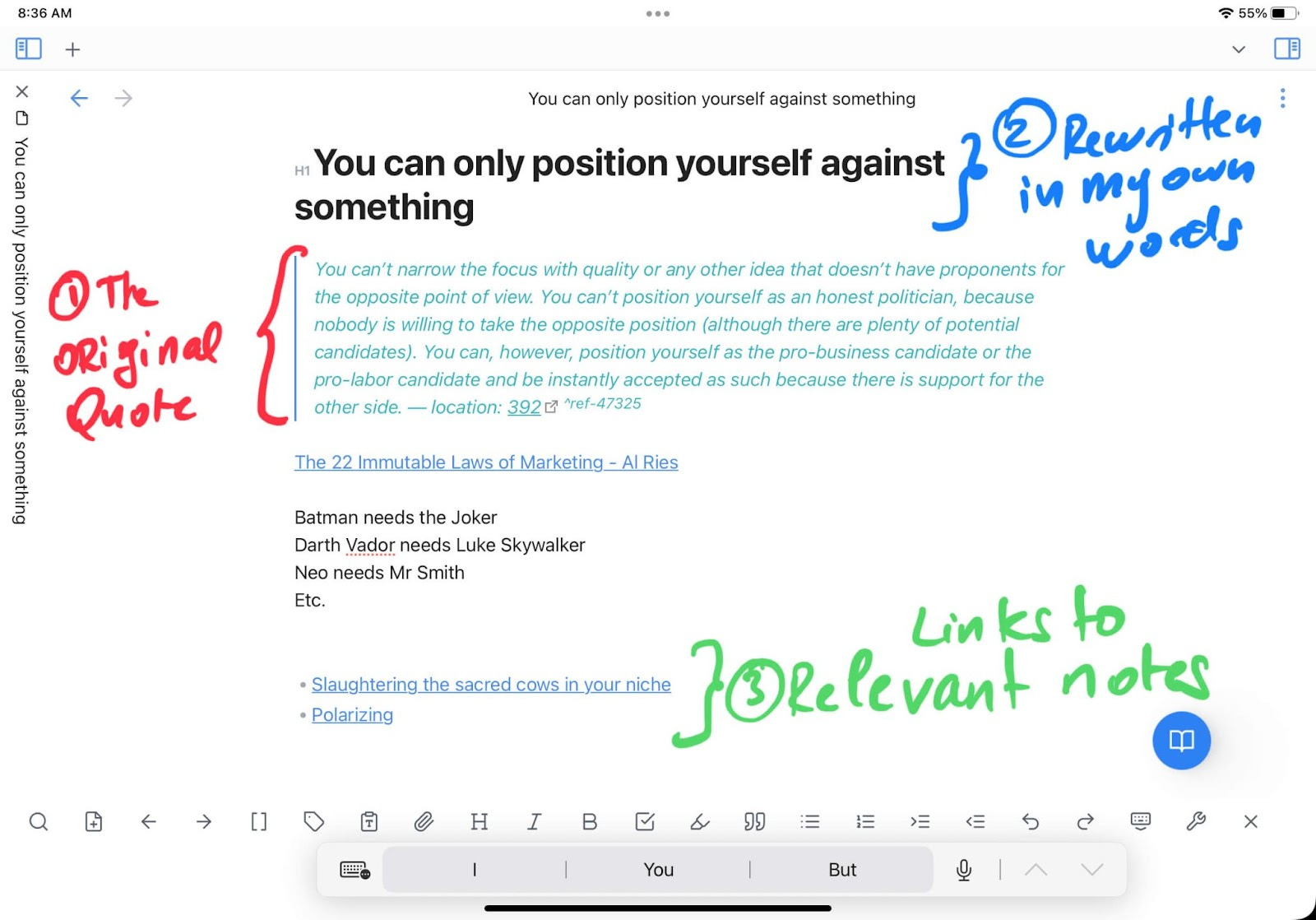
By rewriting ideas in your own words, you're doing the mental heavy lifting. You're not just copying and pasting. You're actually thinking about what the idea means and how it applies to your world.
This creates "idea building blocks" you can mix and match however you want.
The best way to organize your notes
Most people organize their notes with folders and tags.
I tried that, too. It was like stuffing everything into a closet and hoping it would magically stay organized. (But as you know, it never does…)
Worse, those folders and tags were actually preventing idea collisions. Each note was trapped in its own little box. A "copywriting" note could never bump into a "nutrition" note because they lived in different folders.
It's like trying to build with Legos when all your pieces are locked in separate rooms.
The beauty with atomic notes is that you don't organize them with folders or tags, but with backlinks.
Now, my notes could roam free and crash into each other in ways I never expected.
Backlinks encourage unexpected connections. They let you link notes from totally different topics as long as they make sense to you. Then you can quickly pull them together when you need them.
That's how you find ideas ChatGPT will never come up with.
The first step is using a note-taking app that supports backlinks. There are tons of them. I use Obsidian because it works on all devices and has everything I need.
Look back at that previous screenshot. You'll notice I didn't add any tags or folders to the note. I just added a few links (3).
This simple act starts weaving a web of connections between your once-isolated ideas.
Ditch the old-school filing cabinet approach. Let your notes come alive and start talking to each other.
Visualize your ideas and spark new ones
Now your notes are ready to create new insights.
All you have to do is explore the connections you've made and start combining ideas.
I'm a visual guy, so I can't live without Obsidian's "graph view" feature. It shows me the connections between my notes like this:
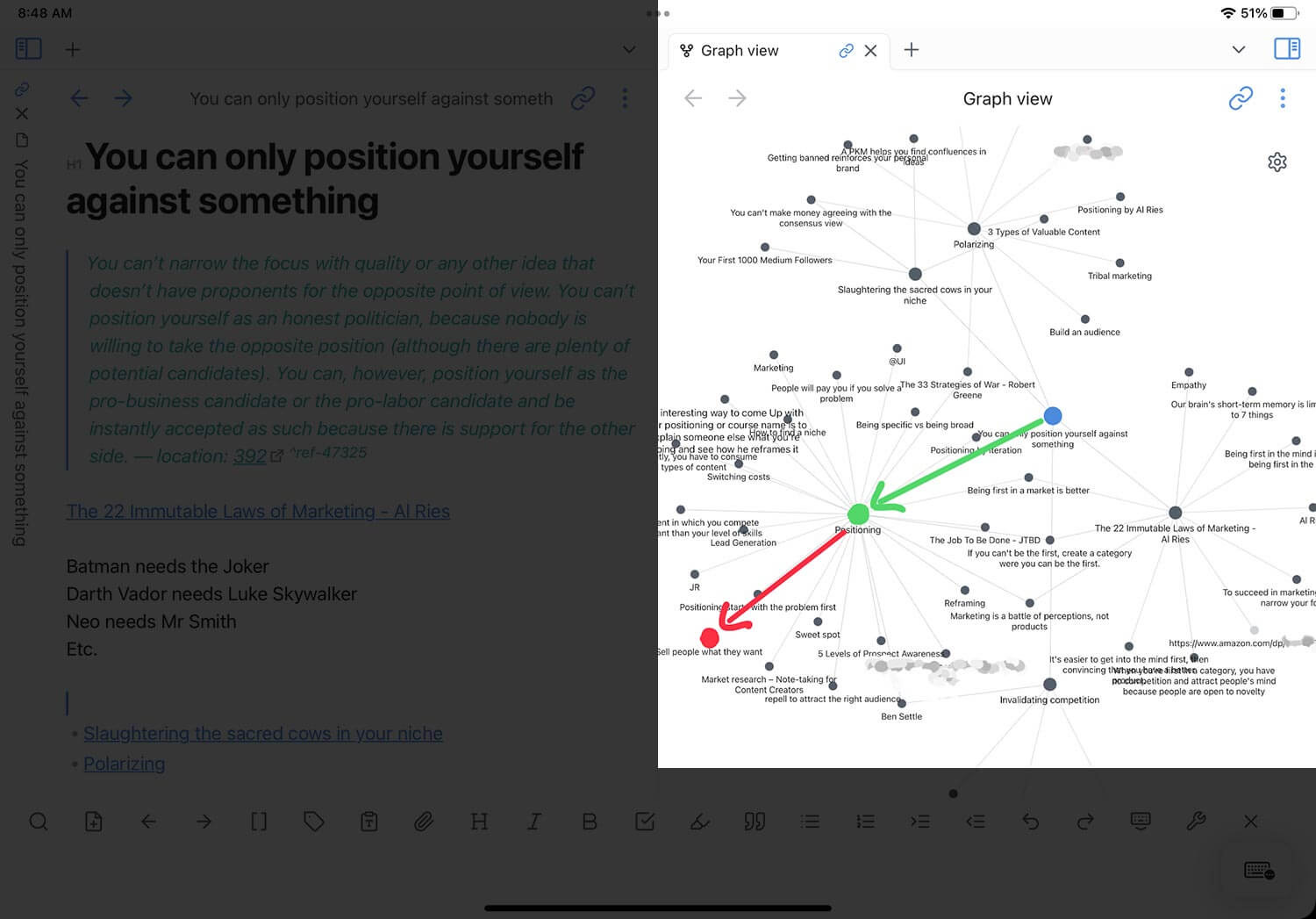
My eyes scan the graph, and kaboom! I can easily spot notes for a listicle or combine ideas to create something new.
Here's an idea I found in just a few seconds by looking at the graph above.
Notice these two ideas:
"You can only position yourself against something" (blue dot) and
"Sell people what they want" (red dot)
This sparked the following insight:
You should position yourself (or your product) against what people currently do by identifying what they actually want.
Here are some examples: People want to:
Build apps without learning code
Sell online courses without becoming a copywriting wizard
Get social media followers without spending 3 hours a day commenting, scrolling, and feeling like a piece of feces.
This one tiny insight gives me an avalanche of content ideas. It would even make great ideas for digital products.
And sometimes, all you need is one good idea.
Once you have the idea, it's time to create an outline.
And how are we going to create the outline? Very simple: based on your notes.
Here's the first part of the outline I used for this article:
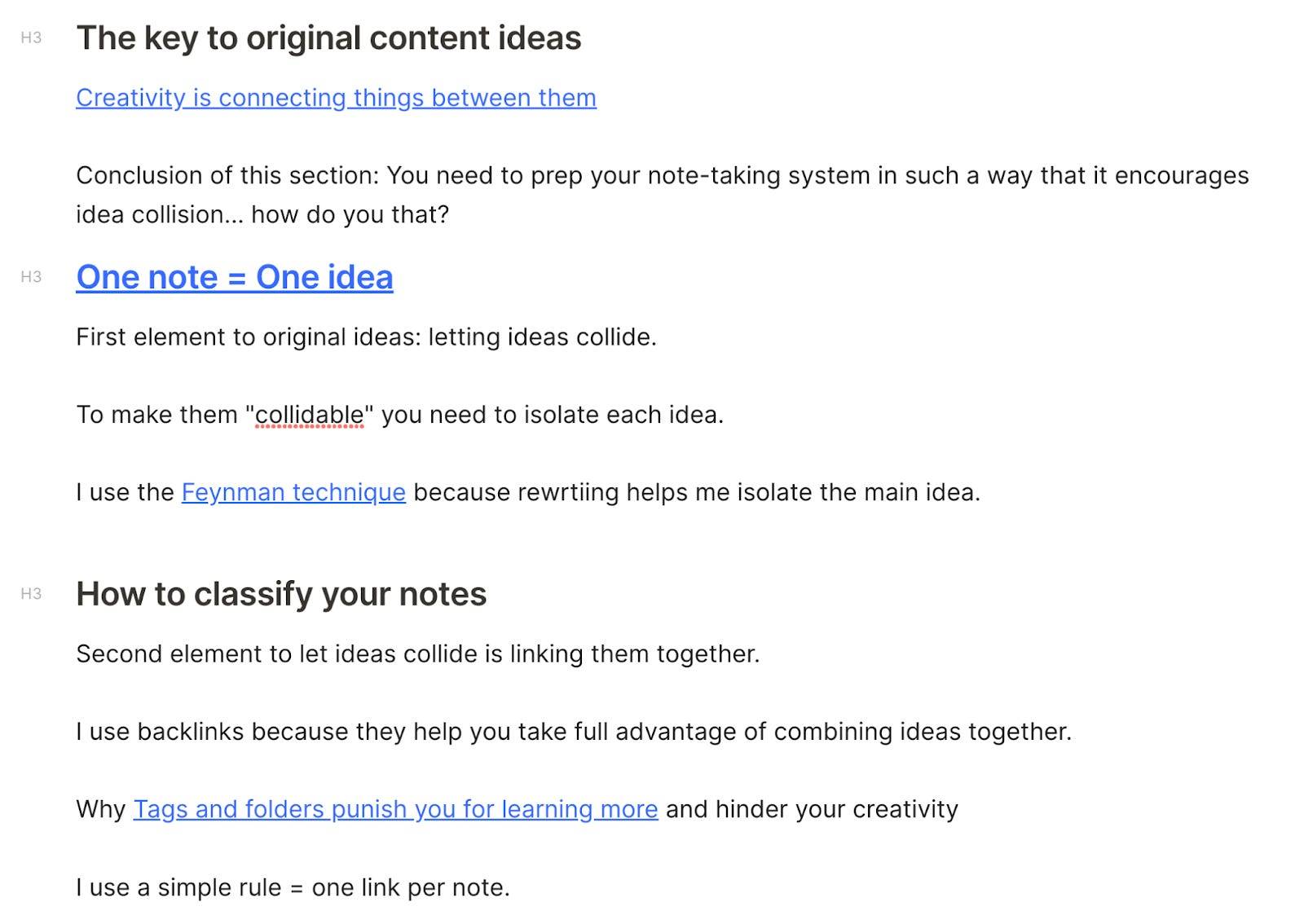
The cool thing? All of these are my own insights about the subject.
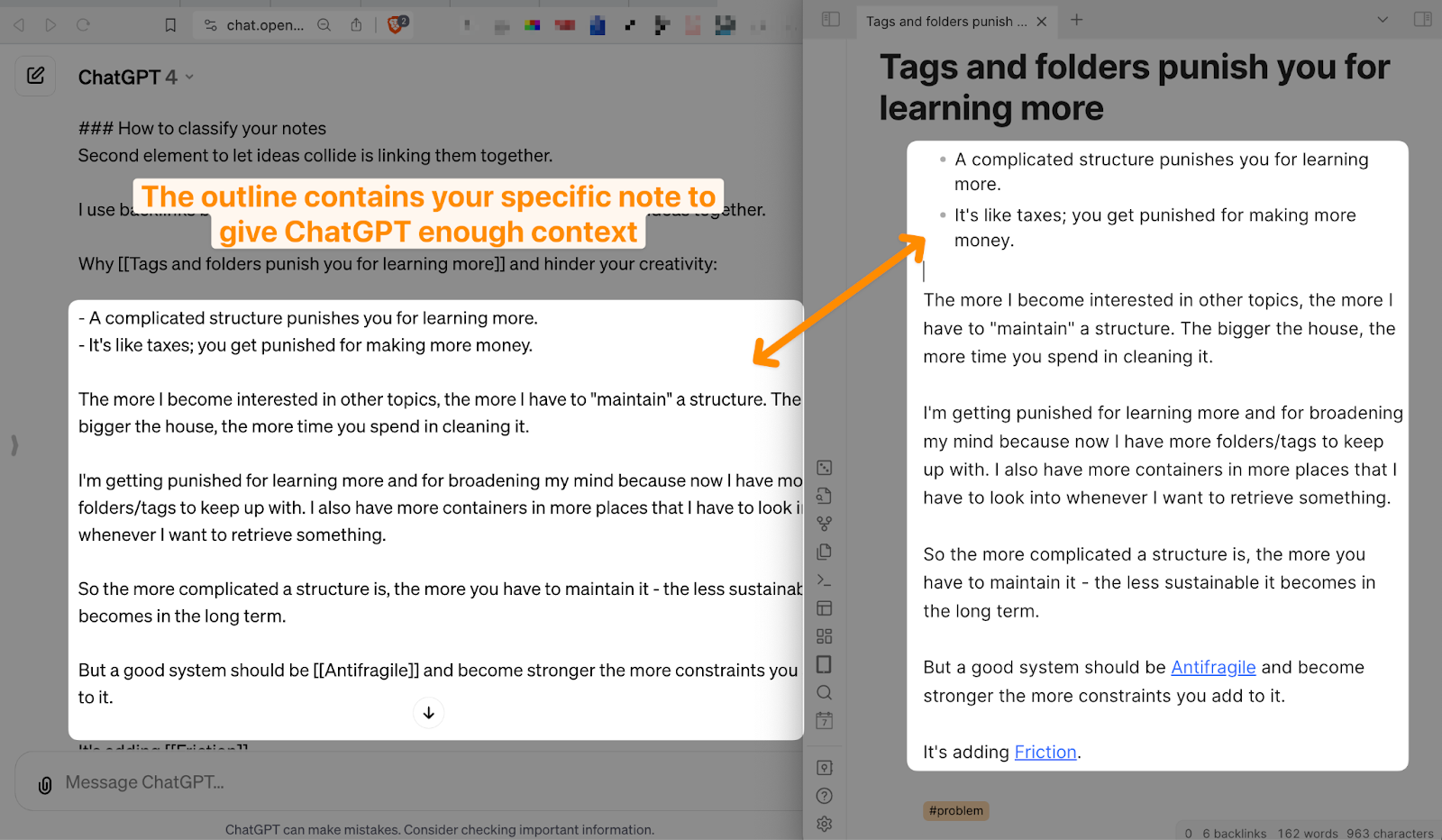
Each blue link goes back to an atomic note with the full idea. I can then feed that context to ChatGPT so it actually understands what I want it to write about.
Train AI to write like you
The skeleton of your content is ready: The angle and the outline.
You've got everything you need to make AI write about your ideas.
But how do you make it sound like you?
Because if you just ask it to write an article based on your outline… you'll end up with robotic content that puts people to sleep.
I used to trash ChatGPT openly because of this exact problem.
Turns out, I was just being ignorant.
I didn't know you could train ChatGPT to write in your voice. I was using those generic prompts you see plastered all over X and YouTube.
But after spending 100+ hours in trial and error, I finally figured it out.
The easiest way is to feed it a sample of your previous writing.
Grab a piece of content you wrote in the past that represents your style.
Then head over to ChatGPT, use the latest model, and start with this prompt:
ROLE=Act as my writing assistant.

CONTEXT=We are writing an article for {SPECIFY AUDIENCE HERE. Example: content writers who want to use AI to write better content.}

TITLE= {ARTICLE TITLE HERE}

OUTLINE= {PASTE OUTLINE HERE}

Please confirm you've understood and wait for further instructions.
The outline is just your ideas, followed by what each note contains about it.
Here's an example with ChatGPT on the left, and my notes on the right:
Then follow up with this prompt:
We are going to write an article based on the previous outline. But before you start writing, I'm going to provide you with a sample of my writing.
Here it is:
{ENTER AN ARTICLE YOU WROTE HERE}

So here is what I want you to do:
1. Analyze the writing style
2. Match all your further responses in this session to the SAME style
3. Wait for my further instructions.
I didn't screenshot this part because it would be way too long. But you should get something like this:
[Screenshot reference maintained]
Sit back and watch AI write unique content based on your notes
Now you've done the heavy lifting.
Use this simple prompt and watch ChatGPT crank out your article in seconds:
Follow up with:
Now, let's write the article in accordance with the provided writing style and follow the outline.
Each subsection should have a word count of {specified amount of words} words.
Let's write it section by section, skipping the introduction. I'll write the introduction separately.
I've found that ChatGPT writes better articles when you break it down section by section.
Here's an example:
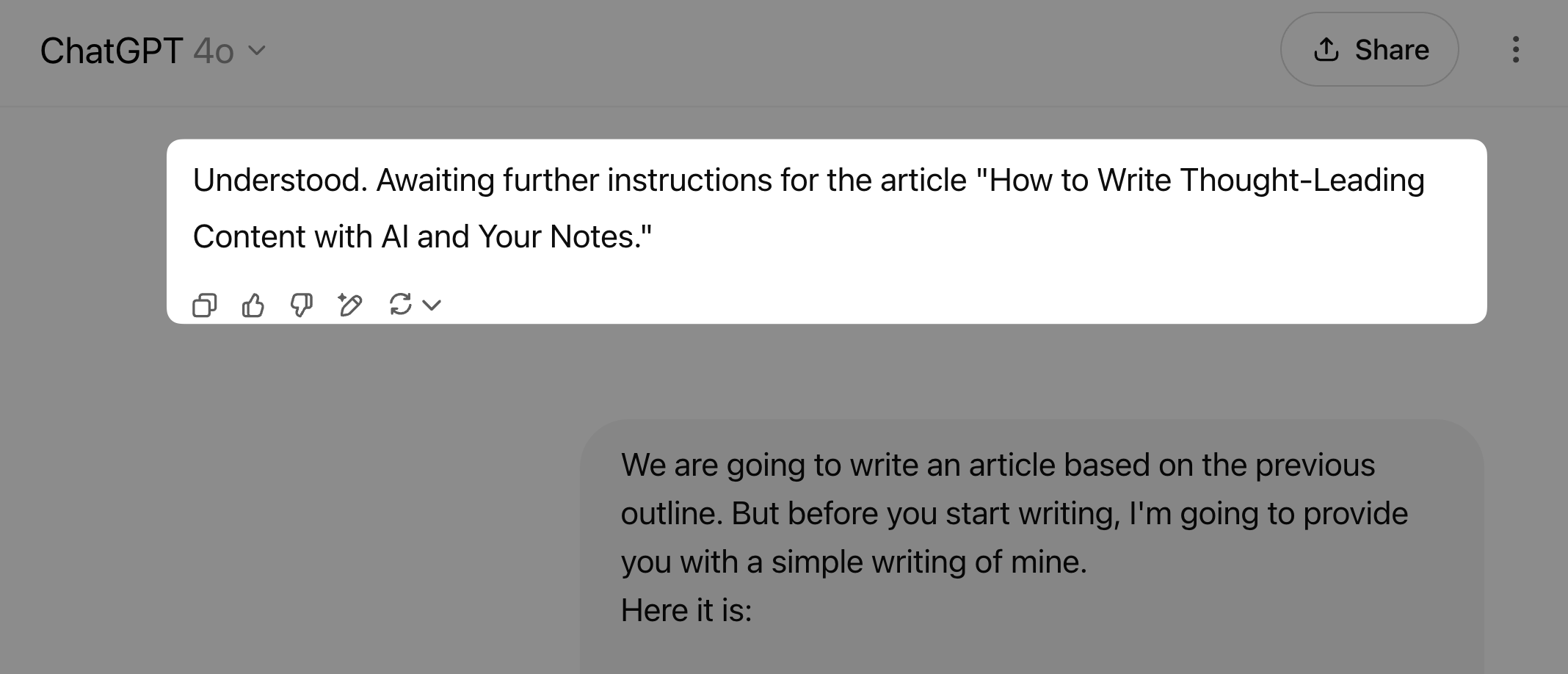
Pretty solid, right?
All you do is keep prompting "next" until you've got the full article.
Will it need some editing? Of course.
But you've got a great first draft to work with.
Now, what about the introduction?
I like to generate the intro separately to make sure ChatGPT nails it.
Let's create one.
Write an introduction that grabs your reader's attention (and compels them to read)
You've got a solid article based on your unique insights.
But that's not enough to make people actually read it.
That's why intros matter. A good introduction is short and hits the problems and desires directly. It makes people want to keep reading.
Let's see how to write one that works.
We're going to use a mix of copywriting frameworks:
Problem, Picture, Agitate, Imagine, Transition.
First, introduce the problem.
Second, paint a real-life picture of how this shows up in their world to make them nod
Third, agitate the problem and show how it gets worse if they ignore it.
Fourth, make them imagine what life looks like once the problem is solved.
Finally, add a smooth transition.
Here's the prompt we'll use:
Now, let's write a 100 word introduction for the article:

- State the problem with a rhetorical question by openly stating the problem we're solving in the article which is: {MAIN ARTICLE IDEA HERE}.

Don't mention the target audience.

- Talk about a specific situation in the reader's day that illustrates the problem. Start with "You know what I'm talking about:"

- Amplify the problem: show how this can become worse if the problem is not solved.

- Introduce the solution to overcome the problem and achieve the emotional desired outcome. Start with "What if" or "Instead"

- Conclude with a teasing sentence like "Let's see how"

Use very simple words and short sentences. Add line breaks to increase readability. Use the same writing style as provided earlier in the session.
Here's an example of a similar article to this one:
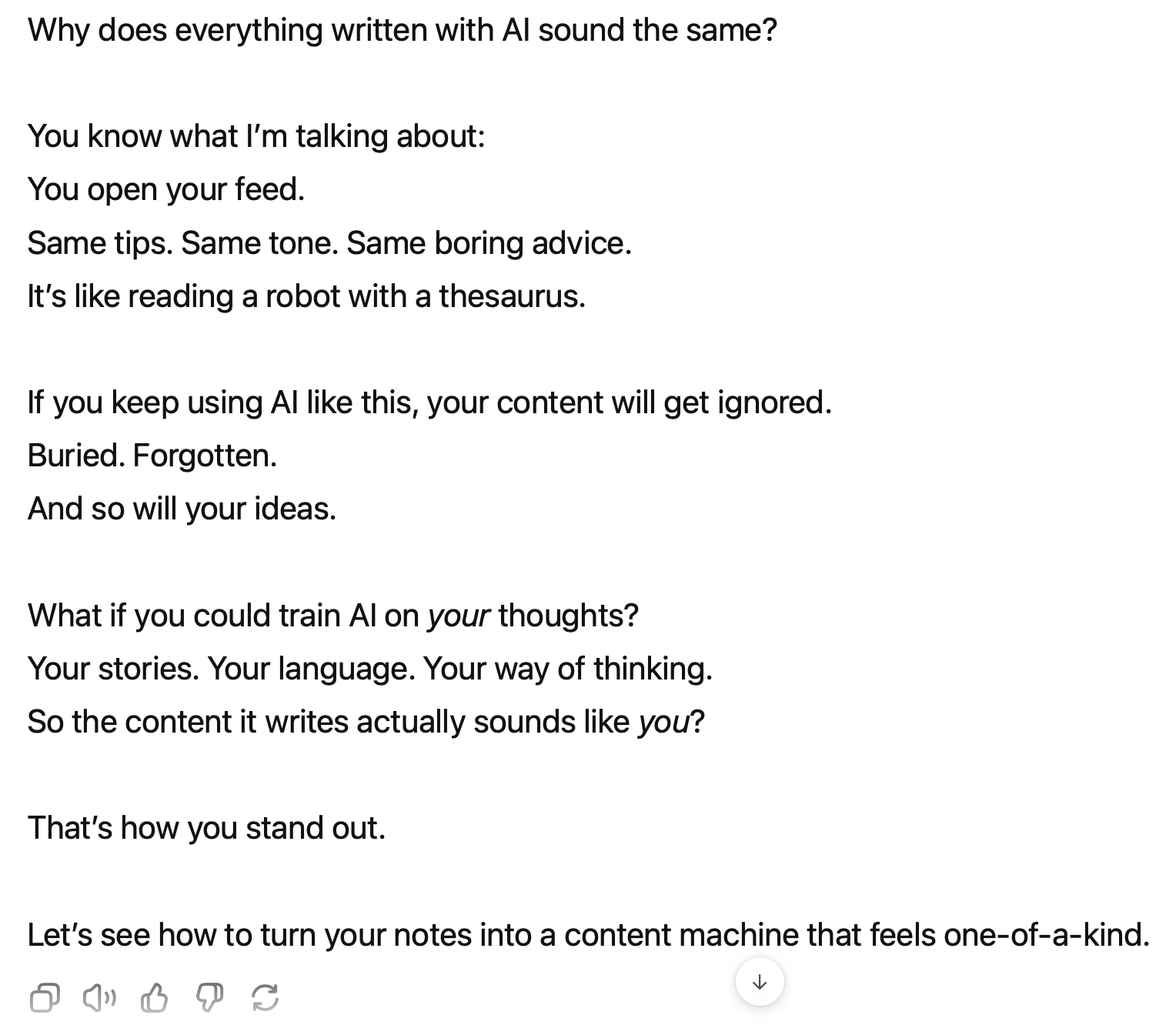
Is it perfect? No. But it’s almost 70% there.
And that’s what writing with AI really is. It gets you closer to writing content faster. But it won’t replace your voice or ideas.
If you want more help on how to set up such a note-taking system, feel free to check out my free email course on this link.
Just realized in the substack app you cannot select, copy, or interact with these prompts. What a shame. (code block embeds)
I’ve for a long time preferred reading in mobile or desktop browsers but this is just an additional reminder to never read from the substack app.
Substack is something else - I keep running into exactly what I need without trying lol! I love the concept of using AI, just didn’t know how to use it without making more work for myself. Thanks so much! Looking forward to your content!